Wednesday, June 20, 2012

game design document


Before showing the designs and completed version of my interface for this game. I will first take you through an explanation of the controls. This will help you to understand what it is my interface will be doing and how it will work.

‘animal crossing: city folk’ is on the wii and only for the wii. Which even though it would be nicer if it was on different gaming platforms, it wouldn’t be possible to make this happen, because it would affect the controls and the overall gaming experience that you receive.

The controls are fairly simple but many of them are motion based. Most of the motion based controls can be substituted with a button control for instance fishing can be activated by swinging your remote like a fishing rod. Or it could be activated by pressing the ‘A’ button.  Moving this game onto a different platform will take away this ability. Even though the ‘X-box connect’ has recently emerged. The experience still won’t be quite the same since with the wii you have a physical object that will act as a rod

Motion also has an effect on whether you can see the inventory options or not. When the pointer is not on the screen everything on your screen will be gone.  Though once on the screen the inventory tab will become available. When your character is not walking or moving the clock will then come up. The idea was to make as much screen see able as possible. Without cluttering it up with icons and such.

The controls were made to be quite easily understandable as the game was aimed to make it playable for children of the age of 3+, which was achieved since the controls are simple and easily memorable.      
Despite the young age rating, the most common people to play these games are either, older teens that aren’t massive or hard core gamers and would prefer a more relaxing and easy going game, or young children.
Having the age rating as it is, strikes me as an extremely good idea as it vaguely teaches the ‘grown up’ life style to children in a fun way, since this game is a ‘slice of life’ style game in which you are made to earn money, make friends with neighbours and pay a mortgage. Unfortunately for the more thrill seeking gamers, this game is not what they would look for.        

There aren’t many games in this franchise, with there only being 3. The first, on the Nintendo game cube, the second, on the Nintendo DS, and the third, on the Nintendo wii.
Each of these games all have the same basic controls, goals, and graphics. They don’t differ much aside from the designs of the interfaces and the quality of the graphics since each game has had big time differences.


Every one of the game interface designs have all been rounded and soft which I liked very much and wanted to keep in my design. The colours are also quite bright but not to ‘in your face’ I liked this and wanted to keep it.


Whilst designing my interface for ‘animal crossing: city folk’ I kept in mind the parts that I liked the most from the original game.  In one of the 3 games there was use of rounded squares instead of just circles.so I decided to bring that trait back and based most of my interface around rounded square shapes.
The aim of my interface was to take up as less space as possible of the screen but too keep at least something on there to indicate that there is in fact a menu.


Overall I am happy with the way that my final outcome has ended up and I think that it is smart and simple. Sticking to the original themes but also being something new.  

Wednesday, June 6, 2012

flash game graphics practice


during this project we created some tester interfaces and graphics for some simple flash games. 

the first game we made was a maze type game. 
i wanted my game to follow a happy childish type theme. so i chose to go with apples which introduced a red and green colour scheme. 
i also like the look of web two graphics. the shininess of them makes them look somewhat like plastic toys.      


i do like the end product of this game but if i were to do it again i may have made the apples on the main title animated. this would have made it a bit more interesting and fun.

the second game we were asked to create graphics for was not necessary a game but a photo taker. it was a more fun type of webcam. 
i chose yet again a childish theme to this as i find them more fun to think up ideas or themes for. 
when thinking of a name i though looking glass was a cool one. And taking the theme from the name i chose to use a 'Alice and wonderland' theme


and finaly i create some graphics for a golf game we were given.
unfortunately there weren't many things i could change on this game 
i use the web two graphics style again as i like the look of it 
but this time i went for a simplistic style 


Thursday, May 3, 2012

game interface redesign


we were asked to either choose an already existing game or a made up game to create or redesign an interface for. 
i chose the game 'Animal crossing: city folk' to re-design.

animal crossing is a sort of slice of life game. it simulates a more fun, childish and simplistic version of adult life. you are made to gather your own money, by selling anything you can get your hands on. once you get this money you can choose to either spend it on furniture to furnish your house or to pay of your mortgage.
in the later, more newer games in this franchise you are able to by things such as 'designer' fashion, hairdressing or coffee.


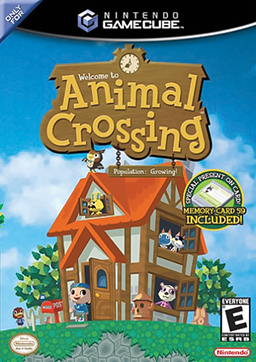
the very first animal crossing was originally released in Japan on the Nintendo 64. but latter came out on the Nintendo gamecube in English.
wild world and city folk came after. and there is now another game in the early stages of making.

each game have all had similar styles. weather it be in graphics, game play or interface.
all of the interfaces have very distinct similarities. the use of circles and light colours is very common but in the middle one kind of brakes the tradition as the colours are a bit more vibrant. but it still keeps the circle theme

http://www.videogamesblogger.com/2008/12/08/animal-crossing-classic-gamecube-review-nintendo-debuts-its-sim-life-communication-series.htm
http://ds.neologasm.org/animal-crossing/
http://wn.com/Animal_Crossing:_City_Folk

when not in the inventory  there is always a clock in one corner of the screen with the date and day.
they all seem to follow similar colour schemes yellows with browns or greens. and yet again use the circle or rounded theme
  
 Hebby in Sentosa 

i started by sketching up two different ideas for my interface.
because of the use of rectangles in wild world i decided i wanted to bring them in a bit more. 
so both of my designs had squares in them.
in the second design i tried to bring the clock aspect in like in city folk. 


 i decided to go with my second menu design for my interface.
but i don't like the clock from either of my sketches.
in the first animal crossing they use circles to put the date and time in. i wanted to use this as well, so i adjusted it to what i felt was better, by using less circles

with the menu down
with the menu up
interface separate 

overall i like the outcome of my redesign 
it doesn't take up much of the screen, so you are still able to see allot of your surroundings.
i think maybe if i added a stroke, or a glow, or changed the colours around the menu it may be more noticeable as, after i added it to the screen shot it kind of merged into the background


unity and U.D.K


unity

we were shown a program called unity. 
this program enables us to be able to create our own terrain for a game. it lets you add in different things for example. the time of day is changeable, also the type of water you can use can be changed, from purely decorational to water that you can swim in. 
creating a terrain is quite simple. after getting a basic canvas to create your environment. you can start to manipulate it by raising the level of the floor to create mountains or craters. there is a range of different shape brushes that help to give of different effects with the mountains or craters.
the foliage and trees are also just as simple. after choosing a texture for the foliage you can then start to paint it onto your terrain, you can choose how dense you want it to be. unfortunately the tree and foliage brush is a bit irritating to use since you cant see the brush unless you zoom in very very close.
despite this small problem, unity is a good easy program to use.  
during being showed how to use unity, we were given time to play around and create our own terrain, using what we know.
i started to create one of my own. surrounding it in water and making them look like tropical islands. 

Unreal Development Kit
http://www.youtube.com/playlist?list=PLA2DE3D64B848BC63&feature=plcp
we were also shown how to use the unreal development kit to create a game terrain. this one was a more enjoyable and interesting program to use. it was simple and over all the look of the finished terrain was allot better than in unity. the textures were nicer and you have also got the ability to import or use pre set 3d models. for example you can import things such as pillars , chain fences and more.
like unity you are able to change the time but in this program you can also change and add in different light sources.     


when making a terrain you can put it inside of a hollow box to create a kind of room, and since you have the ability to chop away at parts with different shapes you could create a series of rooms. because of the many different shapes for making things, you can make stairs and extra levels. the possibilities of what is able to be made is allot bigger in this program.  

unfortunately in U.D.K you are not able to create things such as bushes, trees or water. 


Thursday, March 8, 2012

interfaces


There are allot of different types of interfaces. Basically anything that does something after being interacted with can be called an interface. For example a dog If you pet it, it will react by say waging its tail. Though the main type of interface I will be taking about are human computer interfaces.  
What makes human computer interfaces different from others is that it is used in computer science as a tool and concept that refers to a point of interaction between components. This is usable on software and hardware. It allows a component such as a graphics card, or an internet browser, to function independently  using interfaces to communicate with other components.

Thursday, February 23, 2012

flash game interfaces

to gain a better understanding on game interfaces we were asked to research into good and bad game interfaces. the games in which i researched into were some flash games i had found on the internet. 
 the first example was a flash game i had found on http://www.flashgames247.com/play/5929.html
it was a game in which you had to serve penguins food and earn enough money throughout the day.
the interface is simple though a bit confusing at first glance. the orange numbers in the right hand side is the amount of money you are required to earn in that day of the game. and the green is the money you have reached. 

though at first look there is no indication as to what the orange one is. the green numbers are quite obviously your money as it is on the cash machine. whilst playing through the game you come to understand what exactly it is the orange is. personaly if i were to create the interface for this game i would have had the goal away from your actual money and have it say on a clip board saying goal. it may be strait forward but its fast and simple to know what it is though i liked this interface very much

since im looking at game interfaces i thought it would be best to look at allot of different game interfaces. not just from a flash game.

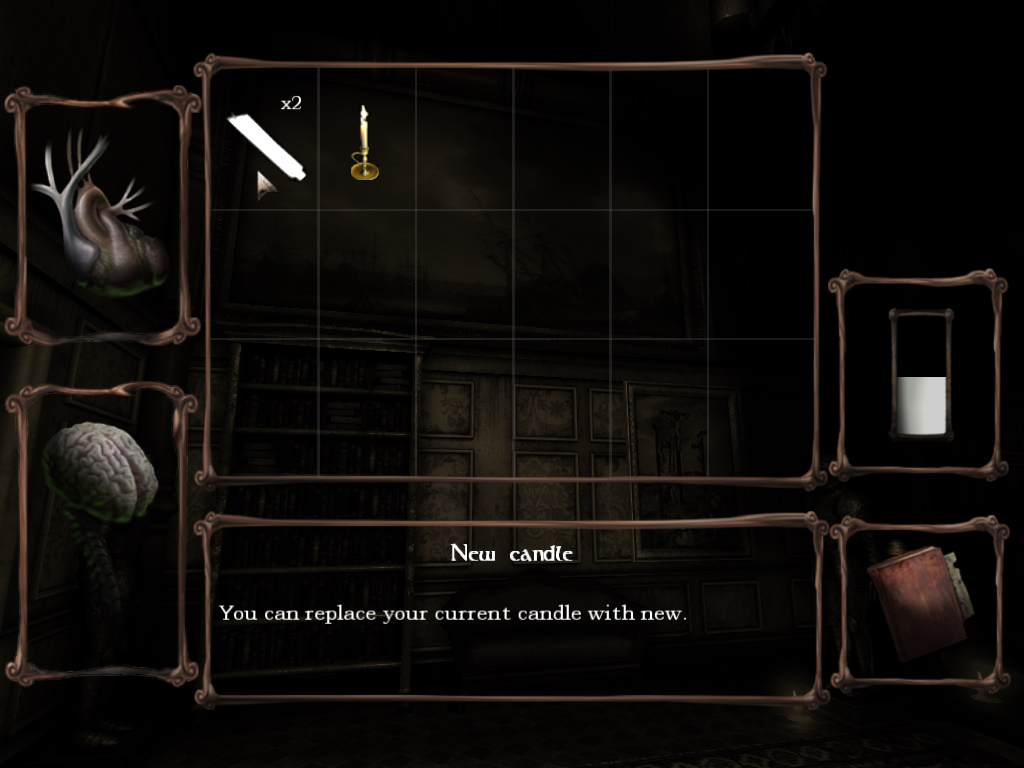
i chose a pc game called amnesia: dark decent
its an indie horror style game.
the interface is incredible simple.


 aside from the inventory of the game that shows you your health, sanity, notes, oil and items you've picked up.
In the actual game play there is nothing in your screen aside from a dot in the centre that may change to a hand if there is something you can interact with.


i like the simplicity of the interface and it makes being able to see your surrounding allot better since there is nothing to get in the way. but it could also improve by adding in a bar on the side or something to show you how much sanity or health you have. as it does get a bit irritating not knowing.

overall i have come to discover that most game interfaces are quite simple and there aren't many parts to it.
and despite the fact that they are simple its okay because they are quite self explanatory. 


temperature interface

we were given the task of creating a graphic interface for an equoid.
i was in a group consisting of Jodie, connor and Adam. and we chose to create an interface that only showed the  temperature. though in staid of using numbers or words we wanted to present our information with animation or pictures. to give of a more different and creative way.

after a discussion of sharing our ideas we came to the conclusion of using the seasons to represent the temperature. and to do this we were going to create pictures of a castle fantasy land scape that changes seasons depending on the information coming from the equoid. though due to time constraints we had to change our idea to a simple tree that looses its leaves

thanks to adam and connors research i and jodie were able to create accurate illustrations of the sky and tree depending on the season      

the research was collected by conner and Adam http://www.csinterfaces.blogspot.com/2012/02/research-for-castle-idea.html
http://ii23.blogspot.com/2012/02/research.html

final tree design


if i were to re do this project then i would have changed the way the temperature was shown and i might have added in the use of numbers. i would also have tried to show all the different things like stretch in staid of just the temperature 
but over all i like the creativity of our outcome. despite the fact that it didn't hold any 'professional' quality